 ArkSOS
An alert evening, in four moments
The alert arrives. Official alerts for your area, with colour, validity and source. The “Allerta di oggi” (“Today's alert”) widget shows it without opening the app.
The network goes down. The map, walking routes and places of the region you downloaded stay on your phone: you see the distance and the walking route to useful places.
You tell your people. Ready-made “I'm OK” and “I need help” messages to send as text messages to the people you choose. With a compatible radio, also over the radio network.
You let people find you. The beacon sends a proximity signal to people nearby with the same app. It does not call the emergency services: if you are in danger call 112.
Try it here.
The demo phone works: tap the buttons, open the pages, switch tabs. Eight steps, a few minutes.
The app is in Italian: the phone shows its real wording.
The interactive demo uses a small script from this website. Without it, you can read the eight steps below.
-
Let your people know
One tap on «Sto bene» (I'm OK) or «Chiedo aiuto» (I need help) prepares a text message with your location. Your name is optional, and you can remove the map link.
Tap «Sto bene» and type your name
You choose who gets it: it is only sent if you send it from Messages and there is phone coverage. It does not alert the emergency services.
-
What to do in case of…
Short guides for earthquake, flood, fire and hail: what to do during and after. They are on the phone and can be read offline.
Tap «Terremoto» (Earthquake)
Texts from public sources, adapted. ArkSOS is not an official app: in Italy, what the authorities say always applies.
-
The situation in your area
When you are connected you see rain and hail as seen by radar, with the age of the image, and nearby earthquakes. On the map you can replay the last half hour.
Open the map and tap «Guarda l'ultima mezz'ora» (Watch the last half hour)
Every item shows where it comes from and when it was downloaded. Offline you see the last saved data, with its age. Radar can be wrong.
-
The sky above you
When you are connected you see aircraft flying around you, among those that broadcast their position: direction, distance and when they pass.
Change the range and tap an aircraft
Only aircraft that broadcast their position, only when connected and with the app open. Data may be missing or late.
-
Near you, even offline
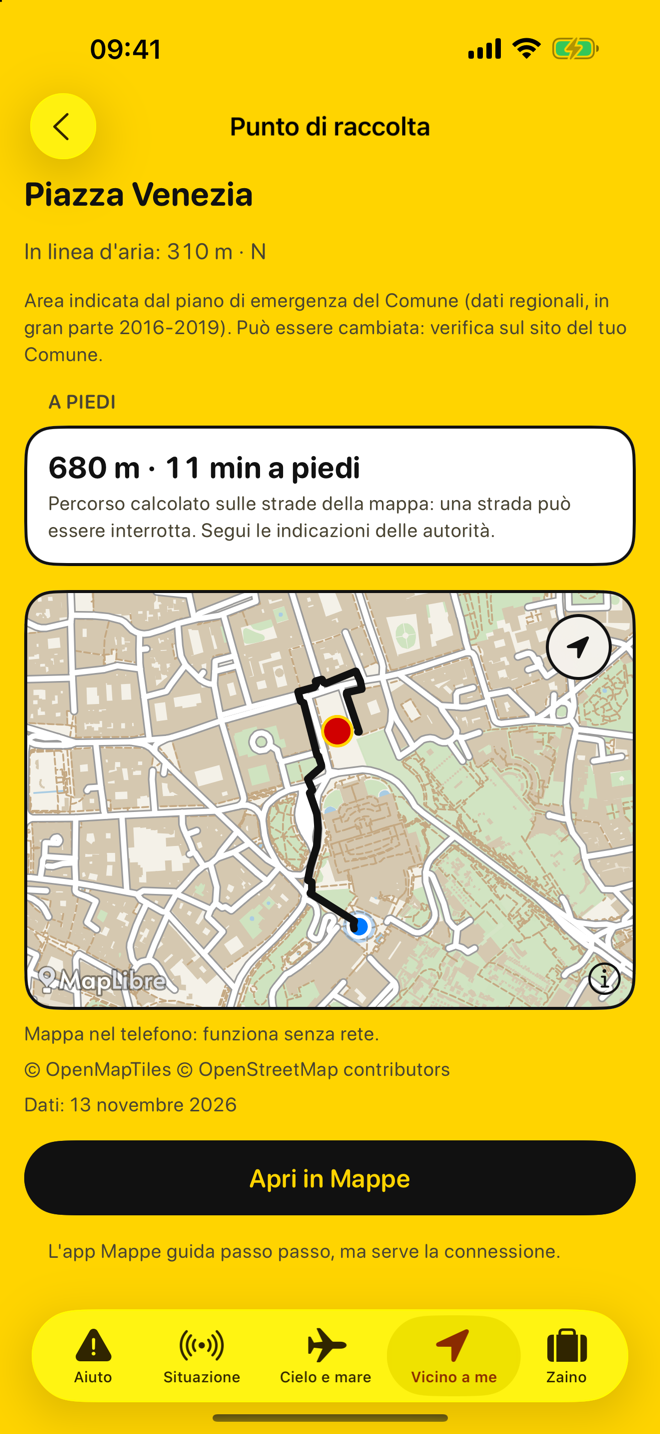
Useful places from OpenStreetMap (hospitals, pharmacies, drinking water, defibrillators) and, in Lazio, the assembly areas from municipal plans, with distance, direction and walking route.
Tap a place for the walking route
Offline it only works on what you have already downloaded: the map, roads and places of your region.
-
The Backpack
The list of what is worth keeping ready, based on your family and the days to cover, with quantities. Tick what you already have.
Tick a few water items
The list and your ticks stay on your phone: no account.
-
Offline, between nearby phones
Messages without a network: ready-made phrases, chosen from a list, that pass over Bluetooth between nearby phones with the app open. People search listens for help signals switched on nearby.
Open «Messaggi senza rete» and choose «Sto bene»
It is not a private message: anyone nearby can read it. The beacon does not call the emergency services and does not replace 112.
-
Private mode
No accounts, no advertising, no tracking. Your location stays on your phone. Public services receive only a location rounded to about one kilometre. In text messages and over the radio you send it only if you choose to.
Tap «Riservata» at the top right
Private mode: the app does not use the internet and does not put your location in messages unless you choose to.
- Mettiti nel vano di una porta in un muro portante, vicino a una parete portante o sotto una trave
- Oppure riparati sotto un letto o un tavolo resistente
- Non stare al centro della stanza: possono cadere oggetti, intonaco e mobili
- Aspetta la fine della scossa: non precipitarti fuori
- Allontanati da edifici, alberi, lampioni e linee elettriche
- Attento a crolli di ponti, frane e perdite di gas
- Controlla come stanno le persone attorno a te
- Prima di uscire chiudi gas, acqua e luce e metti le scarpe
- Non usare l'ascensore e fai attenzione alle scale: possono essere danneggiate
- Vicino al mare: allontanati dalla spiaggia e raggiungi un posto elevato
- Usa poco il telefono e non usare l'auto: le strade servono ai soccorsi
- Raggiungi le aree di attesa del piano di protezione civile del tuo Comune
- Non scendere in cantine, seminterrati o garage
- Non uscire per mettere al sicuro l'auto
- Sali ai piani superiori; non usare l'ascensore
- Aiuta anziani e persone con disabilità che sono nell'edificio
- Chiudi il gas e stacca la corrente; non toccare impianti elettrici con le mani bagnate
- Non bere l'acqua del rubinetto: può essere contaminata
- Allontanati dalla zona allagata verso un punto più alto, o sali ai piani superiori di un edificio
- Guarda dove metti i piedi: possono esserci buche, voragini e tombini aperti
- Non usare l'auto: anche poca acqua può farti perdere il controllo
- Evita sottopassi, argini e ponti
- Segui le indicazioni delle autorità prima di rientrare, spalare fango o svuotare cantine
- Non passare su strade allagate: possono nascondere voragini e cavi elettrici
- Prima di riaccendere gas e corrente fai controllare gli impianti
- Bevi l'acqua del rubinetto solo quando il Comune dice che è potabile; non mangiare cibi toccati dall'acqua
- Esci subito e chiudi la porta dietro di te: rallenta le fiamme
- Usa le scale, mai l'ascensore; non tornare indietro per nessun motivo
- Prima di aprire una porta toccala: se è molto calda non aprirla e cerca un'altra uscita
- Se c'è fumo cammina il più basso possibile
- Se non puoi uscire: chiudi la porta, metti panni bagnati nelle fessure, vai alla finestra e fatti vedere
- Chiama il 112 o il 115
- Chiama il 115 o il 112
- Cerca una via di fuga sicura: una strada o un corso d'acqua. Non fermarti dove il vento spinge il fuoco
- Stenditi a terra dove non c'è vegetazione che può bruciare
- Se non hai altra scelta attraversa il fuoco dove è meno intenso, per passare nella zona già bruciata
- Non fermarti lungo le strade: servono ai soccorsi
- Metti al coperto auto, moto e biciclette, se fai in tempo.
- Ritira o fissa quello che il vento può portare via da balconi e giardino.
- Chiudi persiane e tapparelle: proteggono i vetri.
- Porta dentro gli animali.
- Resta al chiuso, lontano da finestre, vetrate e lucernari.
- Non uscire per spostare l'auto: i chicchi grossi feriscono.
- Se sei in auto, rallenta e fermati dove è permesso: area di servizio, distributore, parcheggio coperto. Non fermarti in galleria, sotto i ponti o in corsia di emergenza, né sotto gli alberi.
- Se sei all'aperto senza riparo, proteggi la testa e allontanati da alberi e pali.
- Attenzione a strade scivolose, rami caduti e tombini intasati.
- Non toccare cavi a terra.
- Fotografa i danni prima di sistemare: serve per l'assicurazione.
- Se c'è una persona ferita o un pericolo, chiama il 112.
Testi controllati il 3 ottobre 2026.
Tre lampi brevi, tre lunghi, tre brevi: è il segnale SOS. Tieni lo schermo rivolto verso chi può vederti.
La torcia consuma batteria.
Il faro manda un segnale Bluetooth che i telefoni vicini con questa app possono vedere. Chiunque sia nei dintorni con un'app o uno strumento adatto può riceverlo.
Il segnale dice: se ci sono persone ferite (solo se lo dici tu), quante persone siete, da quanti minuti è acceso, la batteria. Non dice chi sei né dove sei.
Non chiama i soccorsi. Se puoi, chiama prima il 112.
Non è garantito che qualcuno lo veda.
Funziona solo con telefoni che hanno questa app e il faro acceso. Muri e macerie indeboliscono il segnale: la distanza è solo indicativa.
Il suono segue la forza del segnale, non la distanza: muri e macerie la cambiano. Ogni tanto fermati e ascolta.
Non entrare in edifici pericolanti.
Lo schermo resta acceso mentre cerchi e consuma più batteria. Se lo spegni o cambi app, la ricerca si ferma.
Funziona solo con telefoni che hanno questa app e il faro acceso. Muri e macerie indeboliscono il segnale: la distanza è solo indicativa.
Scegli una frase. La leggono i telefoni vicini che hanno questa app aperta su questa pagina. Non serve la rete.
Il messaggio non contiene la tua posizione né il tuo nome.
Non è un messaggio privato: lo può leggere chiunque sia nei dintorni.
I messaggi restano solo su questo telefono e si cancellano dopo 24 ore.
Se c'è un pericolo e il telefono prende, chiama il 112.
Per quando manca la corrente: niente aggiornamenti continui, niente mappe in rete, schermo scuro. Aiuto, guide, mappa nel telefono e segnale SOS restano.
L'app non usa la rete e non mette la tua posizione nei messaggi.
Il radar può sbagliare: non è un'allerta ufficiale.
Scegli tu a chi mandarlo. Il messaggio parte solo se lo invii da Messaggi e se c'è copertura telefonica. In pericolo immediato chiama il 112.
Example with invented data. No message is sent, no call is made, and the website does not use your location.
Offline
- Map and walking routes. Download your region once: the map, walking routes and places stay on your phone.
- Useful places. From OpenStreetMap: hospitals, pharmacies, drinking fountains, defibrillators and more, with distance and walking route. In many regions the list is incomplete.
- Assembly areas. In Lazio, the assembly areas from municipal plans.
- What to do. Guides for the main hazards, from public sources.
- The Backpack. A checklist of what is worth keeping ready, for you and your family.
- Messages without a network. Ready-made phrases that pass over Bluetooth between nearby phones.
When phones have no signal, radios talk.
With an 868 MHz radio compatible with Meshtastic® (CE marked), connected over Bluetooth, you send and receive ready-made phrases and written messages, also on private channels, and you can turn on the radio beacon, with your location only if you choose to.
Messages are written by other people. It is not an emergency service and no 112 control room listens to this network. Anyone with a radio nearby can read what goes over the radio network.
Let people nearby find you.
Beacon: turn on a proximity signal (Bluetooth, short range) so that people nearby with the same app can find you. It does not call the emergency services and does not replace 112.
People search: the phone listens for proximity signals turned on in the surroundings and tells you whether the signal is getting stronger.
When you are connected
- Official alerts. For your area, with colour, validity and source.
- Your area. Nearby earthquakes, weather, river levels, air quality.
- Radar. Rain and hail as seen by radar, with the age of the image.
- Aircraft in flight. Above you, civil and military, among those that broadcast their position. If you wish, a warning when a military aircraft or one in an emergency passes within 10 km: only with the app open on the “Cielo e mare” (“Sky and sea”) page.
- Widget and watch. The “Allerta di oggi” (“Today's alert”) widget and the Apple Watch app.
- Source and time. Every item shows where it comes from and when it was downloaded. Offline you see the last saved data, with its age.
What stays on your phone, and what does not.
- No accounts. No advertising, no tracking.
- About one kilometre. Public services receive only a location rounded to about one kilometre. In text messages and over the radio you send it only if you choose to.
- Private mode. The app, the widget and the watch do not use the internet and show only the data already on your phone.
- Not private. The beacon and messages without a network do not carry your name or your location, but anyone in the surroundings can receive them. Anyone with a radio nearby can also read what goes over the radio network.
Details are on the Privacy page.
Where to find it
ArkSOS is an iPhone app, with an Apple Watch app. It is free, with no advertising and no purchases. The first version covers Italy. Coming soon on the App Store.
Important
ArkSOS is not a rescue service and not an official app. It does not replace 112, the Italian Civil Protection or the instructions of the authorities. Data may be incomplete or out of date. The beacon does not call the emergency services and does not replace 112; there is no guarantee that anyone receives the signal. Replies to messages come from other people. If you are in danger call 112. The full rules are in the Terms of use; the data sources are in Sources and licences.